How to Display Event Offerings in SAP SLCM | Step-by-Step User Guide
Learn how to display event offerings in SAP SLCM (Student Lifecycle Management) using SAP Easy Access and T-Code PIQACADOFFER00_D. Step-by-step instructions with examples of resources and persons involved in academic courses and events.
Perfect 👍 A User Guide format will make it clearer for staff/students. I’ll create a structured step-by-step training manual style with headings, steps, examples, and screenshots placeholders.
Displaying Event Offerings (Courses / Classes)
1. Purpose
This guide explains how to use SAP SLCM (Student Lifecycle Management) to display event offerings (courses, tutorials, and labs). It also highlights examples of resources and persons associated with events.
2. Prerequisites
- Valid SAP User ID & Password
- Access authorization for SLCM → Course and Event Management
3. Navigation Path
From SAP Easy Access menu:
SAP Menu → Student Lifecycle Management → Event Planning → Display Event Offerings
Or directly use the Transaction Code (T-Code):
PIQACADOFFER00_D
4. Step-by-Step Procedure
Step 1: Log in
- Open SAP GUI.
- Enter User ID & Password → Press Enter.
Step 2: Access Event Offerings
- In the SAP Easy Access menu, follow the navigation path.
- Or enter PIQACADOFFER00_D in the command field and press Enter.
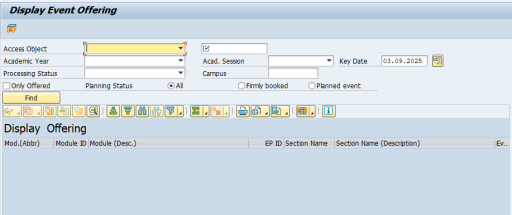
Step 3: Enter Selection Criteria
Fill in the required fields:
- Academic Year / Session (e.g., Fall 2025)
- Organizational Unit (e.g., Faculty of Sciences)
- Module / Course Type (e.g., Statistics 101)
- Date Range (optional)
Step 4: Execute Search
- Press Execute (F8).
- The system displays a list of available event offerings.
5. Examples
Example 1: Event Offering (Course)
- Course Code: STAT-101
- Course Name: Introduction to Statistics
- Semester: Fall 2025
Example 2: Resource (What you need)
- Room: NB-L001 (New Campus, Building B, Lab 1)
- Equipment: Multimedia Projector, Whiteboard
Example 3: Person (Who is involved)
- Instructor: Dr. Rauf (Faculty of Statistics)
- Student: Muhammad Yasir (Enrolled Student)
6. Notes
- Event offerings = Academic courses/events (lectures, labs, tutorials).
- Resources = Rooms, equipment, materials needed for classes.
- Persons = Instructors and students.
7. Troubleshooting
- If no events appear → Check academic year/session filter.
- If you don’t have access → Contact SAP SLCM support team.